
正则表达式
匹配规则
注意正则表达式在Java代码中也是一个字符串,所以,对于正则表达式a&c来说,对应的Java字符串是”a\&c”,因为\也是Java字符串的转义字符,两个\实际上表示的是一个\
单个字符的匹配规则如下: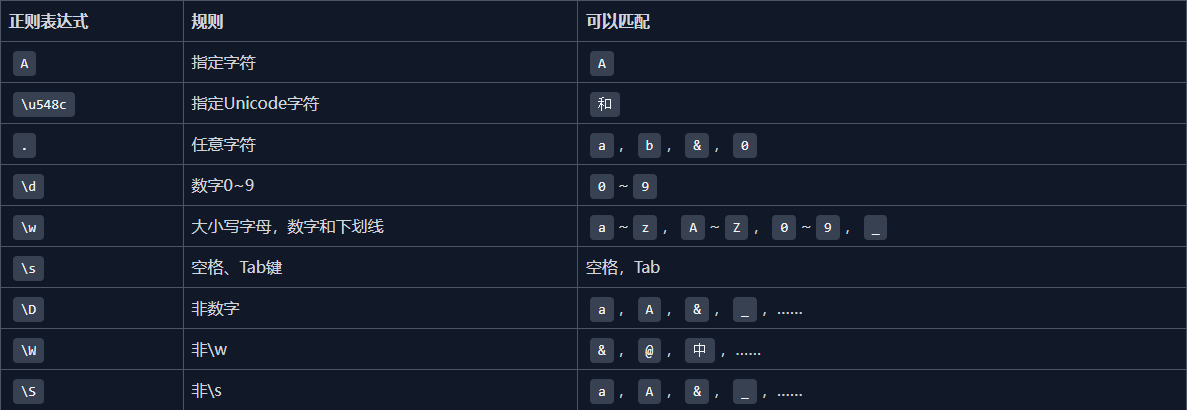
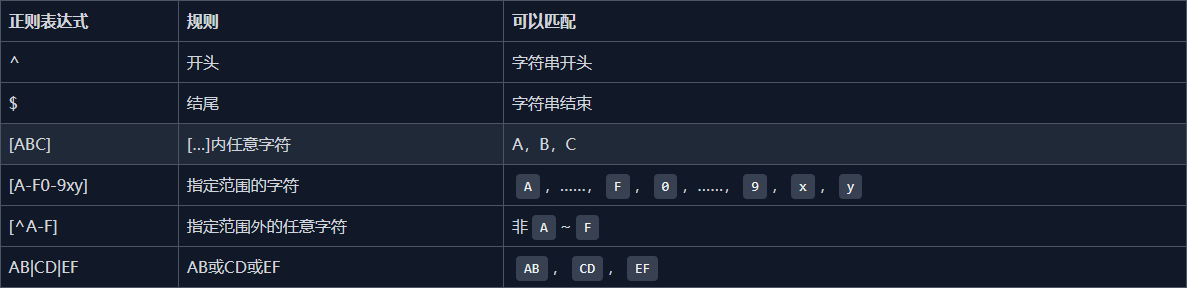
多个字符的匹配规则如下:
复杂匹配规则
分组匹配
String.matches()
正则表达式用(…)分组可以通过Matcher对象快速提取子串:
group(0)表示匹配的整个字符串;group(1)表示第1个子串,group(2)表示第2个子串,以此类推。
eg:
1 | import java.util.regex.*; |
Pattern
反复使用String.matches()对同一个正则表达式进行多次匹配效率较低,因为每次都会创建出一样的Pattern对象。完全可以先创建出一个Pattern对象,然后反复使用,就可以实现编译一次,多次匹配:
1 | import java.util.regex.*; |
非贪婪匹配
在没有非贪婪匹配的时候
1 | import java.util.regex.*; |
正则表达式匹配默认使用贪婪匹配,可以使用?表示对某一规则进行非贪婪匹配;
1 | import java.util.regex.*; |
搜索和替换
分割字符串
eg:
1 | "a b c".split("\\s"); // { "a", "b", "c" } |
搜索字符串
1 | import java.util.regex.*; |
我们获取到Matcher对象后,不需要调用matches()方法(因为匹配整个串肯定返回false),而是反复调用find()方法,在整个串中搜索能匹配上\\wo\\w规则的子串,并打印出来。这种方式比String.indexOf()要灵活得多,因为我们搜索的规则是3个字符:中间必须是o,前后两个必须是字符[A-Za-z0-9_]。
替换字符串
使用正则表达式替换字符串可以直接调用String.replaceAll(),它的第一个参数是正则表达式,第二个参数是待替换的字符串。
1 | // regex |
反向引用
如果我们要把搜索到的指定字符串按规则替换,比如前后各加一个<b>xxxx</b>,这个时候,使用replaceAll()的时候,我们传入的第二个参数可以使用$1、$2来反向引用匹配到的子串。
1 | // regex |
上述代码的运行结果是:
1 | the quick brown fox jumps <b>over</b> the <b>lazy</b> dog. |
本博客所有文章除特别声明外,均采用 CC BY-NC-SA 4.0 许可协议。转载请注明来源 Blog of Sof!
相关推荐

2025-12-11
IoC & AOP理论概述
文章主要参考摘要(包括图片、代码出处)IoC & AOP详解(快速搞懂)PS:文章只适合复习,不适合入门 IoC(Inversion of control)概念解析 控制反转 控制 :指的是对象创建(实例化、管理)的权力 反转 :控制权交给外部环境(IoC 容器) 概念:IoC (Inversion of Control )即控制反转/反转控制。它是一种思想不是一个技术实现。描述的是:Java 开发领域对象的创建以及管理的问题。 使用 IoC 思想的开发方式 :不通过 new 关键字来创建对象,而是通过 IoC 容器(Spring 框架) 来帮助我们实例化对象。我们需要哪个对象,直接从 IoC 容器里面去取即可。 我们 “丧失了一个权力” (创建、管理对象的权力),从而也得到了一个好处(不用再考虑对象的创建、管理等一系列的事情) IoC的好处两个优势 对象之间的耦合度或者说依赖程度降低; 资源变的容易管理;比如你用 Spring 容器提供的话很容易就可以实现一个单例 IoC和DI的关系 IoC(Inverse of Control:控制反转...

2026-01-07
设计模式
参考文章23种设计模式(Java版,超详细!),菜鸟教程-设计模式 设计模式介绍设计模式的优点 提供了一种共享的设计词汇和概念,使开发人员能够更好地沟通和理解彼此的设计意图。 提供了经过验证的解决方案,可以提高软件的可维护性、可复用性和灵活性。 促进了代码的重用,避免了重复的设计和实现。 通过遵循设计模式,可以减少系统中的错误和问题,提高代码质量。 设计模式六大原则 开闭原则(Open Close Principle): 开闭原则的意思是:对扩展开放,对修改关闭。在程序需要进行拓展的时候,不能去修改原有的代码,实现一个热插拔的效果。简言之,是为了使程序的扩展性好,易于维护和升级。想要达到这样的效果,我们需要使用接口和抽象类,后面的具体设计中我们会提到这点。 里氏代换原则(Liskov Substitution Principle): 里氏代换原则是面向对象设计的基本原则之一。 里氏代换原则中说,任何基类可以出现的地方,子类一定可以出现。LSP是继承复用的基石,只有当派生类可以替换掉基类,且软件单位的功能不受到影响时,基类才能真正被复用,而派生类也能够在基类的基础上...

2025-12-15
Redission
参考Redisson-分布式锁 问题分析在集群模式下或者分布式的系统下,存在多个JVM,不同JVM之间用的是不同的锁监视器,也就意味着可能产生并行而锁不生效的问题,也就导致了线程并发安全问题,为此就需要一种锁监视器,可以让不同的JVM之间使用,也就需要分布式锁 基本原理 什么是分布式锁:满足分布式系统或者集群模式下多进程可见并互斥的锁 特点: 多进程可见 互斥 高可用 高性能(高并发) 安全性 分布式锁的实现(常见) redis常见的实现之一就是通过Redisson Redisson快速开始 引入依赖: 12345<dependency> <groupId>org.redisson</groupId> <artifactId>redisson</artifactId> <version>3.16.2</version></dependency> 配置Redission客户端: 123456789101112@Configurationpublic...

2025-12-11
SpringMVC
封面图片来源文章参考视频参考 概述MVC 是一种设计模式,Spring MVC 是一款很优秀的 MVC 框架。SpringMVC可以帮助我们进行更简洁的Web层的开发,并且它天生与 Spring 框架集成。SpringMVC下我们一般把后端项目分为 Service层(处理业务)、Dao层(数据库操作)、Entity层(实体类)、Controller层(控制层,返回数据给前台页面). SpringMVC的核心组件 DispatcherServlet:核心的中央处理器,负责接收请求、分发,并给予客户端响应 HandlerMapping:处理器映射器,根据URL去匹配查找能处理的Handler,并会将请求涉及到的拦截器和 Handler 一起封装。 HandlerAdapter:处理器适配器,根据 HandlerMapping 找到的 Handler ,适配执行对应的 Handler; Handler:请求处理器,处理实际请求的处理器。 ViewResolver:视图解析器,根据 Handler 返回的逻辑视图 / 视图,解析并渲染真正的视图,并传递给 Dispatche...

2025-12-23
JVM一篇速览
本文为个人学习笔记,内容大部分摘自JavaGuide,稍有部分修改,如有错误,欢迎指正 基本介绍 全程Java Virtual Machine 特点:直接与操作系统进行交互,与硬件不直接交互 运行机制 将java文件编译成可读的.class文件 类加载器JVM执行.class文件,需要将文件先放入类加载器中 方法区 存放类似于元数据信息方面的数据 eg:类信息、常量、静态变量、编译后的代码… 类加载器将.class文件搬过来就是先丢在这一块 堆 存放一些储存的数据 eg:对象实例、数组… 与方法区共属线程共享区域,存在线程不安全的问题 栈 编写的方法都在此处运行 8 种基本类型的变量+对象的引用变量+实例方法都是在栈里面分配内存 程序计数器 指向下一行我们需要执行的代码 和栈一样都是线程独享的 JVM调优的主要方法就是围绕堆和栈两块进行 类加载器-ClassLoader从类被加载到虚拟机内存中开始,到释放内存共七个步骤:加载、验证、准备、解析、初始化、使用、卸载 其中验证、准备、解析三个步骤统称为链接 类加载器的流程加载 将class文件加载到内...

2025-12-11
SpringBoot相关
参考视频1天搞定SpringBoot+Vue全栈开发 SpringBoot开发环境热部署概述 需求:开发环境,代码频繁修改,重启麻烦 SpringBoot提供spring-boot-devtools组件,无需手动重启 devtools会监听classpath下文件变动,出发Restart类加载器重新加载该类,实现热部署 并不是所有更改都需要重启应用(如静态资源、视图模板),可以通过设置spring.devtools.restart.exclude属性来指定一些文件或目录修改不用重启应用 配置 在pom.xml中添加dev-tools依赖 使用optional=true表示依赖不会传递,即该项目依赖devtools;其他项目如果引入此项目生成的jar包,则不会包含devtools 12345<dependency> <groupId>org.springframework.boot</groupId> <artifactId>spring-boot-devtools</artifactId> <op...
评论